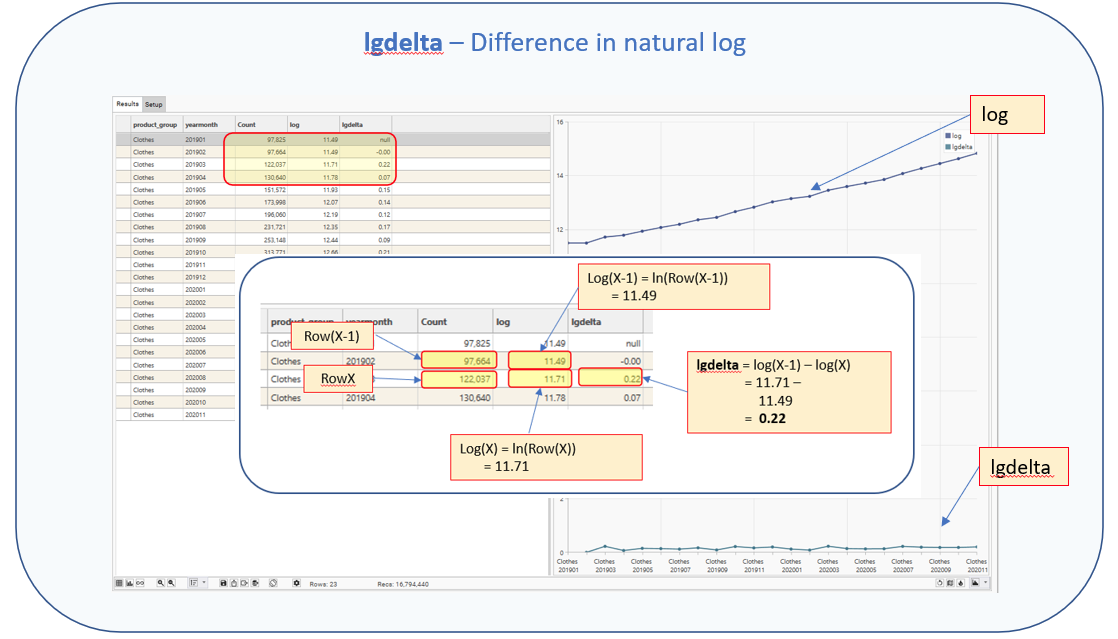
Returns the difference between the natural logarithm for the current row and the natural logarithm for the previous row
Purpose
Use this function to:
- Calculate the change in logarithm
Calculation
- Calculates the natural log for each row (log)
- Calculates the difference between the logs (lgdelta)
lgdelta= log(RowX) - log(Row(X-1))
RowX = value for current row
Row(X+1) = value for next row
log(RowX) = natural log for current row
log(Row(X-1)= natural log for previous row
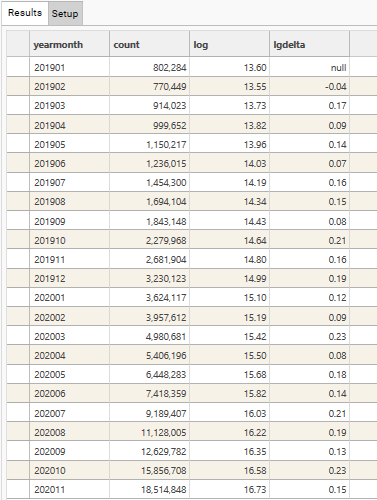
Sample Result
Parameters
| Parameter` | Description |
|---|---|
| Dimensions | Discrete field(s). All fields must come from the same table. |
| Name | Name to be displayed as Column Header in result grid |
| Measure | The field to be used in the post-function calculation.
|
| Function | COUNT / SUM / AVG / MIN / MAX / STDEV |
| Post | lgdelta |
| Value | Optional. Filter to apply when evaluating FUNCTION. Only records in the Filter Recordset will be included in the Function and Post-Function calculations. Must come from same table as DIMENSION/MEASURE or be linked to the Dimension table. |
| Axis | 0 / 1. Y-Axis to use when plotting graph. Default = 0 |
| Plot | Y / N. Specifies whether measure’s output column should be plotted on graph. Default = Y |
| Resolve | Optional. Resolve level for the measure. If blank, Resolve = Dimension Table |
| Series Type | Default / Bar / Stacked Bar / Line / Spline / RangeLow / RangeHigh / CSLow / CSHigh / CSOpen / CSClose Determines the graph style for the measure. |
| Popup | Default / None / Extended |
| Prefix | $ / £ / E / % |
Usage Notes
See log for details on calculating natural logarithms.
Example
NOTE: Measures 1 and 2 are included purely for illustration. It is not necessary to include these measures for the calculation to work.
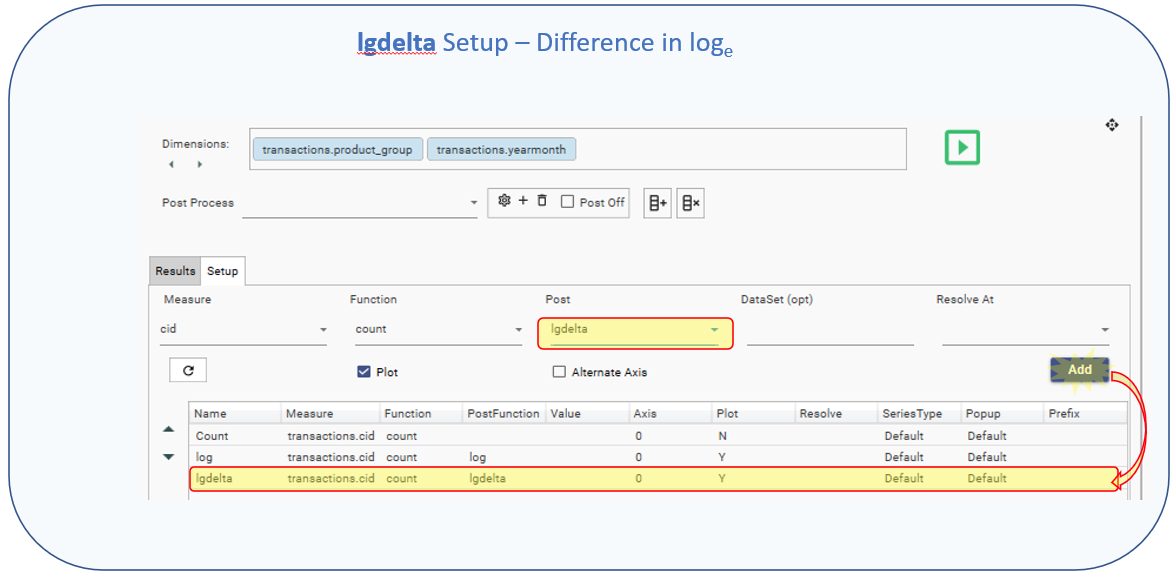
Dimension (s): [transactions].[product_group], [transactions].[yearmonth]
Measure 1
- Name: = Count
- Measure: = transactions.cid
- Function: = count
- Post: =
- Value: =
- Axis: =0
- Plot:= N
- Resolve:=
- Series Type:=Default
- Popup:=Default
- Prefix:=
Measure 2
- Name: = Log
- Measure: = transactions.cid
- Function: = count
- Post: =log
- Value: =
- Axis: =0
- Plot:=Y
- Resolve:=
- Series Type:=Default
- Popup:=Default
- Prefix:=
Measure 3
- Name: = lgdelta
- Measure: = transactions.cid
- Function: = count
- Post: =lgdelta
- Value: =
- Axis: =0
- Plot:=Y
- Resolve:=
- Series Type:=Default
- Popup:=Default
- Prefix:=
Example use: Using lgdelta to calculate the difference in log values